End or archive an event
What you'll do
Mark an event as complete when operations are finished. COBRA 5 offers two ways to do this, and they do different things:
- Set an end date to record when the event finished. The event stays in the active list and everyone retains access. Use this for most wrap-ups.
- Archive the event to remove it from the active list. Archived events are still searchable and their records remain intact, but they no longer clutter day-to-day views.
You can do both: set an end date when the event finishes, then archive it later once you no longer need it in the active list.
Before you start
- You have a role with Edit permission on Events
- You are in the event you want to end or archive, or you can find it in the event list
Steps
Option A: Set an end date
-
Click the event name in the top bar to open the event details flyout.
-
Click Edit Event in the flyout header.
-
In the event edit form, set the End date and time to when operations actually concluded.
-
Click Save Event.
Option B: Archive the event
-
Exit any named event you're currently in so you can reach the event list. See Exit a named event and return to operations mode.
-
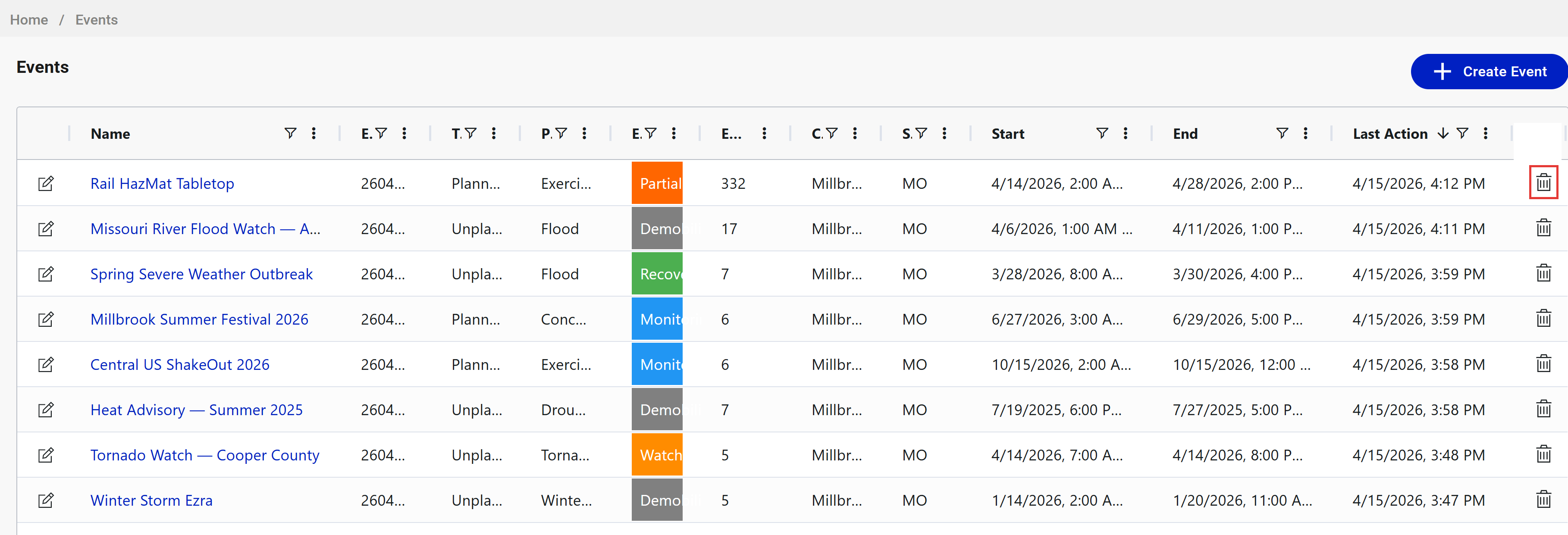
Click the events icon in the left navigation to open the event list.
-
Find the row for the event you want to archive.
-
Click the trash can icon at the right end of that row.
-
Confirm the archive action in the prompt.
Result
After setting an end date: the event's timeline displays the end date, and the event is marked as concluded. Users can still enter the event, view its records, and add to it if needed.
After archiving: the event is removed from the Recently Active Events panel and the default event list view. It remains accessible via the event list's archived filter and through direct links.
Tips
- Setting an end date does not prevent further edits. If late-arriving information needs to be logged, users with access can still enter the event and add records.
- Archiving is reversible. An administrator can un-archive an event if it needs to return to the active list.
- Exiting a named event does not end it. See Exit a named event and return to operations mode for the difference between leaving and ending.
- There is no one-click "close event" action today. Setting an end date plus archiving are the two steps that together represent a full wrap-up.